
Control every processing stage 7 min read
Scaling, Frame Conversion, Seamless Switching, and Video Latency
Understand how resizing and timing conversion affect sharpness, switching behavior, and end-to-end delay.
- Distinguish scaling from aspect-ratio handling.
- Explain frame-rate conversion and frame synchronization.
- Separate seamless switching from low latency.
- Identify and measure the complete video delay path.
Why an AV engineer should care
A picture may be resized in a dock, processor, decoder, and display before anyone sees it. Each stage can be individually functional while the complete path produces soft text, cropped edges, or distracting delay. Assigning clear processing responsibilities makes the system easier to design and troubleshoot.
The preceding lessons established the format and transport. This lesson follows the transformations applied along the way.
Scaling creates a new grid
A scaler calculates a new pixel grid from an input image. Upscaling estimates additional samples; downscaling combines and filters information to fit fewer samples. Neither process can recover detail that was never present in the source.
An exact 2:1 change, such as 1080p to UHD, has a simple geometric relationship, though the processing method still matters. A noninteger change such as 1080p to 1440p requires a different interpolation relationship. Thin lines and text make those differences easier to see than moving photographic content.
Downscaling needs appropriate filtering to avoid aliasing. Poor processing can produce moiré, jagged edges, ringing, or lost fine detail. Repeated resizing can compound damage even when the final raster matches the display.
Aspect-ratio modes answer a different question
Scaling describes grid conversion. Aspect-ratio handling describes what happens when image and destination shapes differ.
| Mode | Typical result | Main tradeoff |
|---|---|---|
| Fit | Whole image, possible bars | Unused display area |
| Fill or crop | Destination filled | Edges removed |
| Stretch | Destination filled | Geometry distorted |
| 1:1 | One image pixel per display pixel | Smaller image or clipping |
| Overscan | Edges intentionally hidden | Lost content and extra scaling |
Terminology varies by product. A 1920 × 1080 image centered without distortion on a 1920 × 1200 display leaves 60 unused rows above and below. A circle and an outside border quickly reveal stretching and cropping.
For a custom LED canvas, define the input raster, region of interest, processor mapping, and physical pixel map. A standard input can contain a custom canvas, but everyone must agree which pixels belong on the wall.
Frame-rate conversion changes timing
A 30 fps source on a 60 Hz output can repeat frames. Converting 24 fps to 60 Hz requires an uneven repeat cadence unless another method is used, which can produce judder. Dropping frames, repeating them, or generating intermediate images each produces a different result.
Motion interpolation estimates new images and can add delay or artifacts. It may be attractive for some viewing but undesirable for interactive desktops or live camera work. Choose a consistent production rate where practical, including the distinction between 59.94 and 60.
Synchronization and switching
Independent sources do not necessarily begin frames at the same instant. A frame synchronizer buffers incoming video so it can be released against the output timing. Genlock instead provides a common timing reference to compatible sources. They address related timing problems from different positions in the chain.
A hard switch can expose the display to a changed format or timing, producing resynchronization and possible authentication disruption. A processor with a stable output can reduce those effects. Seamless switching typically uses buffering and processing to make transitions clean.
Seamless does not mean zero latency. Nor does a consistent output format guarantee every source transition is invisible; product architecture, input locking, and protected-content behavior still matter. HDMI QMS addresses particular frame-rate transitions under supported conditions and should not be confused with a multi-input seamless presentation switcher.
Add the complete delay path
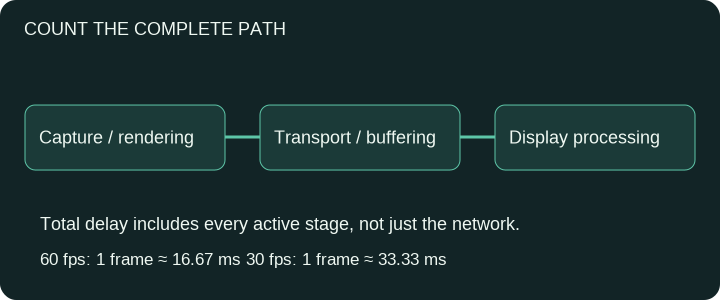
At 60 fps, one frame period is about 16.67 milliseconds. At 30 fps it is about 33.33 milliseconds. A few buffered frames can become noticeable when a live person and a delayed screen image are visible together.
Include camera capture, source rendering, encoding, network buffering, decoding, frame synchronization, scaling, and display processing where present. A manufacturer's encoder/decoder latency figure does not include every other component in the room. Not every scaler buffers a full frame, so use documented or measured behavior instead of assigning an arbitrary frame to every box.
Audio delay may be needed for lip synchronization, but adding it blindly can harm other use cases. Identify the listening and viewing paths being aligned.
Two commercial examples
Conference-room presentation: A laptop, dock, presentation processor, decoder, and display may each offer scaling. Identify the intended output raster and assign one deliberate conversion where practical. Disable unwanted overscan and image processing, then verify fine text at the actual operating format.
Live camera to LED wall: Camera processing, a switcher, transport, and the LED processor contribute to visible delay. Use consistent timing and supported synchronization, select suitable low-latency modes, and measure the complete camera-to-display result. A fast network cannot remove camera or panel processing delay.
Practical exercise
Show a border, circles, one-pixel lines, fine text, and moving content. Compare fit, stretch, and 1:1 modes. For a rough relative-delay observation, record a source display and destination display together at high frame rate. Recognize that both displays have their own delay and rolling-shutter behavior can affect the estimate; this is not automatically an absolute latency measurement.
Compact glossary
- Scaler: A processor that changes the image grid.
- ROI: Region of interest.
- Judder: Uneven motion cadence.
- Genlock: A shared timing reference for compatible video equipment.
- Frame sync: Retiming incoming video against an output reference.
Review questions
- Why can repeated scaling soften text?
- How does frame sync differ from genlock?
- Does seamless switching guarantee negligible delay?
Answers
- Repeated interpolation and filtering can remove or alter fine detail.
- Frame sync retimes an incoming signal; genlock provides common timing to compatible sources.
- No; clean switching can depend on buffering.
Where this fits
The video signal path is defined from pixels through transport and processing. The next lesson will compare display technologies, including LCD, OLED, projection, and direct-view LED.