
Digital conversion 10 min read
From Analog Sound to Digital Audio
Understand sampling, quantization, bit depth, clocking and the bandwidth and latency costs of digital audio.
- Explain sampling, quantization and binary encoding.
- Distinguish sample rate from bit depth.
- Explain Nyquist frequency and aliasing.
- Calculate raw digital-audio data rates.
- Identify sample-rate, clock and buffering problems in AV systems.
Why an AV engineer should care
Once a microphone produces an analog voltage, most modern AV systems convert it into digital data. The audio may then pass through a DSP, Dante network, USB connection, codec and recording system without becoming analog again until it reaches an amplifier.
Understanding that conversion explains:
- Why devices must agree on sample rate
- Why 24-bit audio is common in commercial AV
- Why increasing sample rate consumes more processing and network bandwidth
- Why clock failures produce clicks, dropouts or unusable subscriptions
- Why digital clipping and analog clipping happen at different places
- Where conversion and buffering add latency
The converter is where continuous voltage becomes a stream of numbers. No tiny musicians are involved, despite what the equipment budget may imply.
1. What the ADC receives
The microphone and preamplifier produce a continuously varying voltage representing air-pressure changes.
That signal is analog because it can theoretically take any voltage value at any moment. Before conversion, the input chain usually performs:
- Amplification: Raises microphone voltage into the converter’s useful range.
- Filtering: Removes frequencies outside the intended audio bandwidth.
- Sampling: Measures voltage at regular moments.
- Quantization: Assigns each measurement to an available numeric value.
- Encoding: Represents that number in binary.
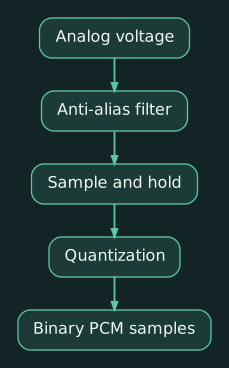
An ADC, or analog-to-digital converter, performs the conversion. Analog Devices describes the two central ADC processes as sampling the waveform at uniform intervals and quantizing each measurement to a digital value. (wiki.analog.com)
Each sample is a number representing amplitude at one moment:
- Time determines which sample
- Bit depth determines which amplitude values are available
- Sample rate determines how frequently measurements occur
The stored samples do not form a crude staircase that a loudspeaker reproduces literally. During playback, a DAC converts the numbers back into voltage, and a reconstruction filter produces a continuous waveform.
2. Sample rate: measurements per second
Sample rate is the number of samples taken from each channel every second.
Common rates include:
| Sample rate | Common association |
|---|---|
| 44.1 kHz | Music distribution and CD-derived workflows |
| 48 kHz | Video, conferencing and professional AV |
| 88.2/96 kHz | Recording, production and selected high-rate AV systems |
| 176.4/192 kHz | Specialized production and measurement |
At 48 kHz, the converter measures each audio channel 48,000 times per second. Each sample period lasts:
1 / 48,000 s ≈ 20.83 μs
The Nyquist requirement
To reproduce a frequency correctly, the sample rate must exceed twice the highest frequency being captured.
A 48 kHz rate has a theoretical Nyquist frequency of 24 kHz:
48,000 ÷ 2 = 24,000 Hz
Human hearing is generally treated as extending to approximately 20 kHz, so 44.1 and 48 kHz can represent the audible range when proper filtering is used. Analog Devices defines Nyquist frequency as half the sample rate and explains that frequencies above it can cause aliasing. (analog.com, analog.com)
Aliasing
Aliasing happens when frequencies above the converter’s usable range appear as false lower frequencies after sampling.
The ADC therefore uses an anti-aliasing filter before conversion to remove ultrasonic content that could fold into the audible range. This filtering is one reason the practical sample rate must provide some margin beyond twice the desired audio bandwidth.
Is 96 kHz automatically better?
A higher sample rate:
- Represents higher frequencies
- Requires more data
- Uses more DSP resources
- Reduces channel capacity on many interfaces
- May reduce buffer duration for a given number of samples
It does not automatically improve a conferencing system. Speech, loudspeakers, room noise, microphone distance and gain structure usually dominate performance.
For commercial AV, 48 kHz is the normal design baseline unless a product or workflow requires something else.
3. Bit depth: available amplitude values
While sample rate divides time, bit depth divides amplitude.
An N-bit sample can represent:
2^N
possible values.
| Bit depth | Available values |
|---|---|
| 8-bit | 256 |
| 16-bit | 65,536 |
| 24-bit | 16,777,216 |
More bit depth provides finer amplitude resolution and lowers the theoretical quantization-noise floor.
For an ideal N-bit converter and a full-scale sine wave, the theoretical signal-to-quantization-noise ratio is approximately:
6.02 × N + 1.76 dB
That gives roughly:
- 16-bit: 98 dB
- 24-bit: 146 dB
Real 24-bit converters do not achieve 146 dB of usable analog performance. Microphone self-noise, preamplifier noise, power supplies and converter electronics impose lower practical limits.
Twenty-four-bit operation still provides useful recording and commissioning headroom. A signal can remain comfortably below full scale without approaching the digital noise floor.
Quantization error
The analog voltage will usually fall between two available digital values. The ADC rounds it to the nearest permitted value. The difference is quantization error.
At sufficient bit depth, the error is small, but without dither it can remain correlated with the signal, especially at low levels. Dither can be added when reducing bit depth to randomize correlated quantization distortion into less objectionable noise.
Dither matters during mastering and word-length reduction. It is not a magic block an engineer needs to sprinkle around every conference-room DSP file like seasoning.
What about 32-bit float?
Thirty-two-bit floating-point audio is useful inside DAWs and DSP engines because it provides enormous mathematical headroom during processing.
It does not mean the analog ADC can capture thousands of decibels without clipping. The physical microphone, preamp and converter still have finite ranges. Floating-point processing can protect intermediate calculations; it cannot recover a waveform already clipped at the analog input or ADC.
4. PCM: the uncompressed sample stream
PCM, or pulse-code modulation, is the standard method of representing audio as a sequence of numeric samples.
PCM specifies the sampled audio data. It does not by itself identify:
- A file container
- A network protocol
- A compression codec
- A connector
The same PCM audio might appear:
- Inside a WAV file
- Across a Dante or AES67 network
- Through a USB Audio Class connection
- Embedded in HDMI
- Inside a DSP’s internal signal path
Audinate notes that most professional digital audio uses uncompressed PCM at 48 kHz and 24-bit. (go.audinate.com)
Compressed formats and file containers are covered in Lesson 7: Digital Audio Files, Codecs and Compression.
5. Calculating the raw data rate
For uncompressed PCM:
bitrate=sample rate × bit depth × channels
A 48 kHz, 24-bit stereo signal requires:
48,000 × 24 × 2=2,304,000 b/s
That equals 2.304 Mb/s of raw audio data.
Some useful examples:
| Format | Raw audio bitrate |
|---|---|
| 48 kHz/24-bit mono | 1.152 Mb/s |
| 48 kHz/24-bit stereo | 2.304 Mb/s |
| 48 kHz/24-bit, 8 channels | 9.216 Mb/s |
| 96 kHz/24-bit, 8 channels | 18.432 Mb/s |
Network transport requires additional bandwidth for Ethernet, IP, UDP, timing and protocol headers. Packetization also affects actual link utilization.
Doubling the sample rate approximately doubles audio payload and processing demand. Audinate’s documentation notes that increasing Dante sample rate may reduce the supported channel count. (dev.audinate.com, dev.audinate.com)
6. Clocking: when each sample occurs
The converter needs a clock telling it exactly when to take each sample.
If two devices use separate clocks, their rates will differ slightly. One device might create 48,000.2 samples per second while another expects 47,999.8. The mismatch eventually causes buffer overflow, underflow, clicks or dropped audio.
A digital-audio system therefore needs:
- A common clock source
- A mechanism to distribute or recover that clock
- Followers that continuously align themselves
Dante uses PTP to establish network timing. That does not change the audio’s sample rate; it synchronizes when networked devices generate and consume samples.
An asynchronous sample-rate converter, or ASRC, can translate between clock domains or sample rates, but it adds processing and some latency.
7. Practical example: ceiling microphone over Dante
Consider a Shure MXA710 feeding a Q-SYS or Biamp DSP through Dante.
The Shure’s Dante/AES67 output operates at 48 kHz and 24-bit. (shure.com) A clean design path is:
- Microphone elements create analog signals.
- Internal ADCs convert them to samples.
- Internal processing forms beams and performs microphone functions.
- Dante packetizes the PCM samples.
- The DSP receives them using the shared network clock.
- AEC and mixing occur digitally.
- A DAC eventually creates the analog amplifier feed.
If the DSP’s Dante interface is configured for an incompatible sample rate, the subscription may fail. Increasing network bandwidth will not solve a format mismatch.
8. Practical example: USB conferencing audio
A room DSP may present itself to a Teams or Zoom computer as a USB audio device.
Potential boundaries include:
- DSP operating internally at 48 kHz
- USB interface advertising one or more supported rates
- Operating system choosing a default format
- Conferencing application applying its own processing
- Sample-rate conversion inside the OS or application
If Windows is configured for 44.1 kHz while the room system uses 48 kHz, the driver may convert it successfully. A poorly handled mismatch may produce silence, pitch changes, clicks or added latency.
For conferencing rooms, configure and document 48 kHz throughout the signal path where supported. Then verify the actual USB recording and playback formats on the room computer rather than assuming the friendly speaker icon handled everything perfectly.
Practical exercise
Calculate the raw audio payload for a DSP carrying:
- Eight microphone channels
- Two program channels
- Two far-end channels
- 48 kHz
- 24-bit PCM
There are 12 channels:
48,000 × 24 × 12 = 13,824,000 b/s = 13.824 Mb/s
Now change the design to 96 kHz:
96,000 × 24 × 12 = 27,648,000 b/s = 27.648 Mb/s
The payload doubles, while the microphones and meeting participants remain exactly as interesting as before.
Compact glossary
- ADC: Analog-to-digital converter.
- DAC: Digital-to-analog converter.
- Sample: Numeric amplitude measurement at one moment.
- Sample rate: Samples taken per second per channel.
- Bit depth: Number of bits available for each sample.
- Quantization: Assigning a measured voltage to an available digital value.
- Nyquist frequency: Half the sample rate.
- Aliasing: False frequencies caused by inadequately sampled content.
- PCM: Pulse-code modulation; uncompressed sampled audio.
- Dither: Low-level noise used when reducing bit depth.
- Clock domain: Devices operating from a common timing reference.
- ASRC: Asynchronous sample-rate converter.
Review questions
- What different properties do sample rate and bit depth describe?
- Why is an anti-aliasing filter placed before an ADC?
- What happens to raw PCM data rate when sample rate doubles?
Answers
-
Sample rate determines how frequently amplitude is measured. Bit depth determines how many amplitude values each measurement can represent.
-
It removes frequencies above the converter’s usable range so they do not appear as false lower-frequency content after sampling.
-
The raw data rate doubles, assuming bit depth and channel count remain unchanged.