
Make recall predictable 7 min read
Show Files, Scenes, Recall Safes, and Virtual Soundcheck
Use console memories deliberately and rehearse changes without overwriting the parts that must remain stable.
- Distinguish a show file from a scene.
- Explain recall scope and recall safes.
- Plan a reversible virtual-soundcheck patch.
- Document and verify an operating baseline.
Why an AV engineer should care
A scene button can change dozens or hundreds of parameters at once. That is useful only when the changes are intentional. A recalled scene that restores yesterday's preamp gain, unmutes a spare microphone, or changes a network patch is an operational failure even if the file loads perfectly.
The previous lesson organized the signal paths. This lesson controls how those paths and settings change over time.
Show files and scenes have different scope
A show file commonly stores a broad console configuration, potentially including routing, channel setup, scenes, libraries, and preferences. Exactly what is included depends on the manufacturer and software version. A scene stores a defined collection of settings for a particular operating moment. Some platforms call smaller snapshots snippets, cues, or presets.
Do not assume that loading a show file behaves like recalling a scene. One may replace global settings that the other leaves untouched. Before moving a file between consoles, verify model compatibility, firmware, installed options, network interfaces, and external preamp ownership.
A USB drive containing a file is not a recovery plan until somebody has tested the restore procedure.
Scope defines what may change
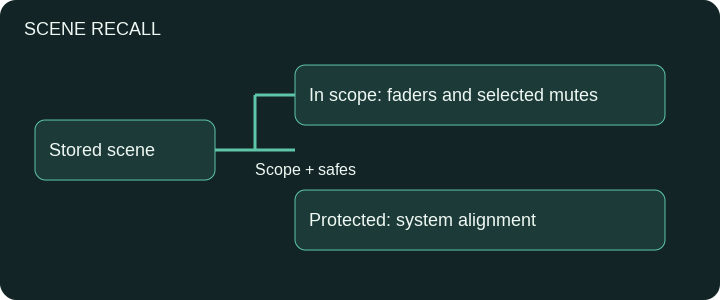
Recall scope determines which categories of settings a scene is allowed to recall. Recall safe protects selected channels or parameters from recall. Together they can separate stable system settings from performance changes.
For a panel discussion, you might recall channel levels, selected mutes, and playback routing while protecting system output alignment and an active recording feed. That is an example, not a universal template: the production's requirements determine the policy.
Parameter-level protection can be more useful than protecting an entire channel. A microphone might need its fader recalled but its input gain protected. Conversely, protecting everything can make scenes appear broken because expected changes never occur. Label the reason for each safe.
Mute safe and recall safe are not interchangeable. One may exclude a channel from a mute group while another excludes parameters from scene changes. Read the platform's definitions.
Build and test a baseline
Start with a known input list, verified patch, named outputs, and safe startup levels. Store a baseline file before programming event scenes. Use meaningful versions and a change log: date, event or room, console model, firmware, and the change made. Avoid files named Final-final-actually-final; they describe an emotional state rather than a revision.
Test recalls in both directions. Moving from scene A to B may work, while returning to A leaves a parameter unchanged because it was excluded from the stored scope. Also test the first recall after a cold start. A sequence that depends on a previous scene can fail when an operator jumps directly to a later cue.
Virtual soundcheck
Virtual soundcheck substitutes recorded multitrack inputs for live sources. It lets an engineer rehearse mixing and scene behavior without asking performers to repeat the program. It does not recreate the complete acoustic event. Live microphone pickup, feedback margins, audience noise, and stage spill still need live checks.
Choose a recording tap point deliberately. A pre-processing recording allows later experimentation with channel processing. A post-processing recording can bake in changes that are applied again during playback. Neither is inherently wrong, but the purpose must be clear.
Document the live and playback input patches. Verify channel order, sample rate, clock ownership, playback levels, and any gain compensation. Keep recording outputs separate from the playback-return route so the system does not create a loop.
Two commercial examples
Hotel ballroom: Presets switch between lectern, panel, and playback. The system processor owns loudspeaker alignment; event scenes own source routing and operating levels. The design should make those boundaries visible so a presenter preset cannot unexpectedly alter a loudspeaker limiter or room-combine configuration.
School theater: A multitrack rehearsal recording feeds the console for cue programming. The operator labels the playback state conspicuously, confirms every recorded channel, and provides a tested return-to-live action. Leaving the console patched to playback on opening night is a routing error, not a failed microphone.
What belongs in the handoff
Deliver the baseline show, event scenes, a scene list, recall-scope notes, safe assignments, and the live/playback patch map. Include the expected startup scene and the recovery steps after an interrupted load. Keep credentials and private event recordings out of a public document.
If the console shares preamps or routing with another system, record who owns those settings. A scene that is harmless on an isolated rehearsal console may change another operator's signal on a shared network. Test with the actual topology.
Practical exercise
In an offline editor or isolated test file, make two scenes with different channel faders and output levels. Protect the output level, then recall both scenes. Confirm that the fader changes and the output does not. Remove the protection and repeat. Write one sentence explaining the result before adding more parameters.
Compact glossary
- Show file: A broader saved console configuration.
- Scene: A stored operating state with defined scope.
- Recall scope: Parameters eligible to be recalled.
- Recall safe: Protection against selected recall changes.
- Virtual soundcheck: Replaying recorded channels through a mix system.
Review questions
- Is loading a show always equivalent to recalling a scene?
- Why test a scene directly after startup?
- Can virtual soundcheck prove live gain before feedback?
Answers
- No; their contents and effects vary by platform.
- It reveals dependencies on previous recalls or unstored settings.
- No; it does not reproduce the complete live microphone-and-room loop.
Where this fits
The routing and memories are organized. Next: conducting a soundcheck that separates signal verification, gain setting, monitor work, and feedback control.