
Treat RF as a system 6 min read
Wireless Microphones, In-Ear Monitoring, and RF Coordination
Understand the radio path, coordinate channels, and distinguish RF failures from audio faults.
- Separate RF and audio troubleshooting.
- Explain why frequency coordination is more than finding empty channels.
- Plan receiving antennas and transmitter separation.
- Verify coverage and battery procedures under realistic conditions.
Why an AV engineer should care
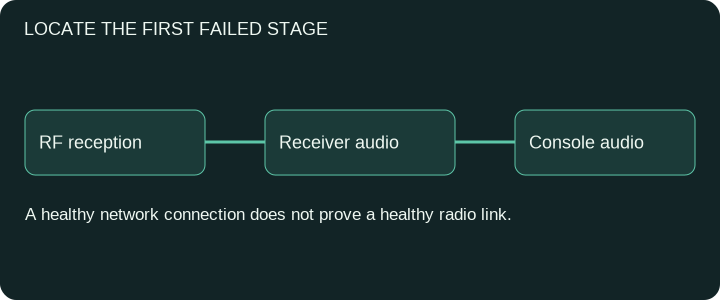
A wireless microphone adds a radio system between the capsule and the console. Perfect audio gain cannot repair an RF dropout, and a full RF meter cannot prove that the capsule or audio input is working. Diagnose the two paths separately.
Wireless reliability comes from compatible frequencies, antenna geometry, suitable signal levels, and operating procedures. It is not created by selecting the highest transmitter-power setting.
Follow both paths
The capsule produces audio. The transmitter encodes or modulates it onto a radio carrier. The receiver recovers the audio and sends it to an analog or network output. Depending on the system, encryption, digital latency, network control, and clocking add further requirements.
Begin with receiver RF indicators, then receiver audio meters, then console input and destination meters. Strong RF with no audio suggests a different problem from disappearing RF and simultaneous audio interruption. A receiver's web UI remaining reachable does not establish that its radio link is healthy.
Frequency coordination
A scan shows RF energy observed at a particular antenna location and time. It is a useful input, not a permanent map of the venue. Other rooms, visiting production equipment, and changing transmitters can alter the environment.
Coordination selects compatible operating frequencies for the actual equipment and local conditions. It accounts for spacing requirements and potential intermodulation products: unwanted frequencies generated through nonlinear interactions. Different wireless systems have different compatibility rules. Two individually clear frequencies are not automatically a good coordinated pair.
Use the manufacturer's coordination tools with correct device profiles and local frequency restrictions. Include installed microphones, visiting systems, in-ear transmitters, and other relevant RF equipment. Coordinate spare frequencies too, then verify them on site.
Antennas are part of the signal path
Receiving antennas need a useful view of the performance area. Hiding them behind metal racks, video walls, or dense structural elements can create avoidable shadowing. Human bodies also affect propagation, so a vacant-room test is incomplete.
Diversity systems use multiple receiving paths to improve reliability. Preserve the manufacturer's A/B arrangement and appropriate separation. Polarization matters, but handheld transmitters change orientation in use; follow the equipment's antenna-placement guidance and test the actual positions.
Coaxial cable introduces loss, which depends on cable type, frequency, and length. Active antennas or distribution amplifiers can compensate for appropriate losses, but excess gain can overload the receiver front end. More RF gain is not always more reliability.
In-ear monitoring reverses the radio direction
With wireless microphones, transmitters are on performers and receivers are usually at a rack. With wireless in-ear monitoring, transmitters are at the rack and receivers are worn by performers. These are different antenna tasks.
Keep powerful transmitting antennas appropriately separated from microphone receiving antennas. Use purpose-built combining or distribution equipment for its intended direction and frequency range. An RF combiner, antenna distributor, and audio splitter are not interchangeable boxes.
In-ear systems also require careful audio gain and level management. A reliable RF link can still deliver an unsafe or unpleasant monitor mix. Establish controlled levels, suitable limiting, and a clear procedure for plugging in or changing sources.
Two commercial examples
Divisible ballroom: Each partitioned room works independently, but opening the partitions creates a larger combined RF environment. Coordinate all simultaneously usable channels as one system. Scene changes can switch audio routing; they do not remove RF interference from transmitters that remain powered.
School theater: Bodypacks work during an empty-stage walk test but fail when performers enter behind scenery. Repeat the test with representative body placement, costumes, scenery, and movement. Check both the weakest coverage areas and locations close to transmitting antennas.
Commissioning and operations
Save the frequency plan, scan, antenna positions, coax types and lengths, distribution settings, transmitter powers, and known exclusions. Label bodypacks and receivers with consistent channel names. Establish charging, spare-battery, and battery-health procedures.
Walk the actual routes while monitoring receiver diagnostics and recorded audio. Include backstage, audience questions, lectern use, and entrances. A good result at center stage does not prove coverage at the door where the host begins speaking.
Practical exercise
On an installed system, observe RF and audio meters while speaking normally and moving through the intended area. Mark any change in RF quality on a floor plan. If audio disappears, identify the first meter that stops behaving normally. Do not change multiple RF settings at once; preserve the known baseline.
Compact glossary
- RF: Radio frequency.
- IEM: In-ear monitoring.
- Diversity: Use of multiple receiving paths to improve reliability.
- Intermodulation: Unwanted products generated by nonlinear interactions.
- Coax: Shielded transmission cable used for RF connections.
Review questions
- Does strong RF prove that audio reaches the console?
- Does an empty channel on a scan guarantee compatibility?
- Why avoid excessive antenna-system gain?
Answers
- No; inspect audio and routing separately.
- No; coordination includes equipment-specific spacing and interactions.
- It can overload receiving equipment and reduce performance.
Where this fits
Wireless is now part of the complete signal path. Next: delivering intelligible audio directly to listeners through assistive-listening systems.