
Define the actual signal 6 min read
Digital Video Foundations: Pixels, Resolution, Frame Rate, and Bit Depth
Understand what a video format describes before specifying a display, transport, or processor.
- Distinguish raster size, aspect ratio, and native display resolution.
- Separate frame rate from refresh rate.
- Explain progressive and interlaced scanning.
- Estimate active video payload from pixels and bit depth.
Why an AV engineer should care
A specification that says 4K leaves out much of the information needed to make a system work. Frame rate, color representation, bit depth, compression, and the capabilities of every device in the path can change the result. This lesson establishes the vocabulary before adding those details.
Digital audio measures a signal over time. Digital video describes an image as a grid of picture elements and updates that image over time. Those two dimensions—space and time—are the starting point.
Pixels and the raster
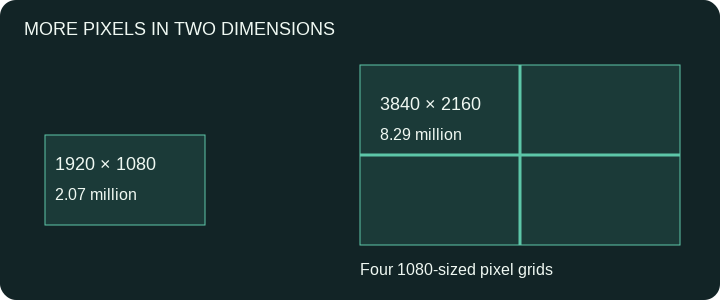
A pixel is a picture element in an image grid. The raster gives the number of horizontal and vertical pixels. A 1920 × 1080 image contains 2,073,600 pixels. A 3840 × 2160 image contains 8,294,400: twice as many in each direction and four times as many overall.
| Common name | Raster | Approximate pixels | Aspect ratio |
|---|---|---|---|
| 720p | 1280 × 720 | 0.92 million | 16:9 |
| Full HD | 1920 × 1080 | 2.07 million | 16:9 |
| WUXGA | 1920 × 1200 | 2.30 million | 16:10 |
| UHD | 3840 × 2160 | 8.29 million | 16:9 |
| DCI 4K | 4096 × 2160 | 8.85 million | About 1.90:1 |
| 8K UHD | 7680 × 4320 | 33.18 million | 16:9 |
More output pixels do not manufacture detail that was absent from the source. A 1080p image scaled to UHD has more samples in its output grid, but its original detail remains limited by the input.
Also separate accepted input resolution, internal processing resolution, and native display resolution. A device can accept UHD and display it on a lower-resolution panel. Its input capability is not its physical pixel count.
Aspect ratio describes shape
Aspect ratio is width divided by height. When image and display shapes differ, the system must preserve the image with unused space, crop part of it, or stretch it. Letterboxing puts bars above and below; pillarboxing puts them at the sides.
A circle is a useful test: stretching a 16:9 image to fill a 16:10 display turns it into an oval. Cropping may preserve shape but remove a spreadsheet column or presentation footer. The right choice depends on the content and should be specified.
Frame rate and refresh rate
Frame rate describes how many images a source supplies per second. Refresh rate describes how often a display updates its presentation. A 30-frame-per-second source shown on a 60 Hz display can repeat each frame; it does not thereby capture twice as much motion detail.
Common rates include 23.976, 24, 25, 29.97, 30, 50, 59.94, and 60. Values that look nearly identical are still distinct timing systems. Consistent formats reduce unnecessary conversion, especially in production paths.
Progressive video sends complete frames. Interlaced video divides the image into alternating fields. A 1080i59.94 signal has about 59.94 fields per second and about 29.97 frame periods. A modern progressive display must deinterlace it. Poor handling can reveal comb-like motion artifacts.
Bit depth describes available code values
With 8 bits, a component has 256 possible code values. With 10 bits it has 1,024; with 12 bits, 4,096. In RGB, three components describe the pixel. Higher bit depth can represent finer gradations and reduce visible banding, especially through processing.
Bit depth does not by itself define color gamut or HDR. A 10-bit signal can carry ordinary SDR content. Nor does a higher-bit-depth output prove that the original image contained additional precision.
For active, uncompressed 8-bit RGB pixels, multiply width × height × frames per second × 24 bits. That gives about 2.99 Gbps for 1080p60 and 11.94 Gbps for UHD60. These are active-picture payload figures. Actual transport rates include encoding and timing overhead; do not use them as direct HDMI cable ratings.
Two commercial examples
Conference-room laptop: A USB-C dock, encoder, network, decoder, and display all advertise 4K. Verify the actual raster, frame rate, color format, and bit depth at each relevant interface. One stage may support UHD30 while the intended desktop experience requires UHD60.
Custom LED wall: A 3072 × 864 canvas does not have a standard 16:9 shape. Document the physical pixel map, content canvas, processor input format, and crop or scaling behavior. Calling the wall 4K conceals the information the content designer needs.
Practical exercise
On a test computer, compare desktop resolution with active signal resolution and the display's native resolution. Record refresh rate and bit depth where available. Then show a border, fine text, and a circle. Note whether the image is cropped, softened, or stretched.
Compact glossary
- Pixel: Picture element.
- Raster: The horizontal and vertical image grid.
- UHD: Ultra-high-definition television raster family.
- fps: Frames per second.
- Progressive: Complete frames rather than alternating fields.
Review questions
- How many times more pixels does UHD have than 1080p?
- Does accepted resolution establish native resolution?
- Why is 4K an incomplete system requirement?
Answers
- Four times as many.
- No; input acceptance and physical display resolution are different.
- It omits exact raster, timing, color representation, bit depth, and other path requirements.
Where this fits
This begins the video course. Next: RGB, YCbCr, chroma subsampling, and signal range.