
Protect text and tonal detail 7 min read
RGB, YCbCr, Chroma Subsampling, and Signal Range
Explain why a sharp video picture can still produce poor desktop text, crushed blacks, or washed-out contrast.
- Distinguish RGB from YCbCr.
- Explain 4:4:4, 4:2:2, and 4:2:0 sampling.
- Identify full-range and limited-range mismatches.
- Specify color handling for desktop and video content.
Why an AV engineer should care
Two paths can both deliver 3840 × 2160 at 60 frames per second and look different. Small colored text may blur on one, while the other produces gray blacks. Resolution alone cannot explain these problems. We need to know how the pixel values are represented and interpreted.
The previous lesson defined the grid. This lesson describes the information carried within it.
RGB and YCbCr
RGB describes red, green, and blue components. In a simple 8-bit full-range example, zero on all three is black, 255 on all three is white, and a high red value with zero green and blue produces red. The color system and transfer behavior still matter, but the component idea is straightforward.
YCbCr represents a luma component, Y′, plus two color-difference components, Cb and Cr. Luma is related to perceived brightness but is not identical to physical luminance; the prime indicates that it is derived from nonlinear component signals.
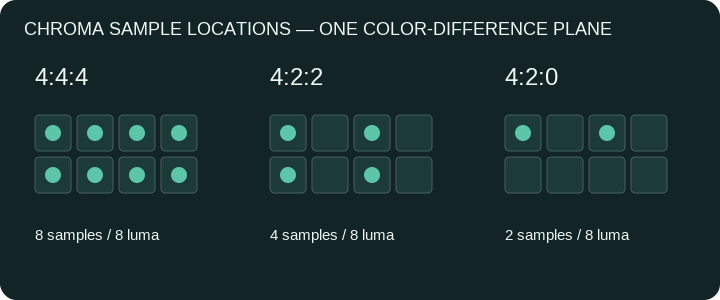
Separating luma and color difference permits the color components to be sampled less densely. YCbCr itself does not require that reduction. A 4:4:4 YCbCr signal retains full spatial sampling for all components.
Why reduce color detail?
Human vision generally resolves fine brightness detail better than fine color detail. Many moving images tolerate reduced chroma resolution well. Small colored text, thin CAD lines, and desktop interfaces can be much less forgiving.
| Sampling | Chroma sampling relative to luma | Average bits per pixel at 8-bit depth |
|---|---|---|
| 4:4:4 | Full horizontal and vertical | 24 |
| 4:2:2 | Half horizontal, full vertical | 16 |
| 4:2:0 | Half horizontal and half vertical | 12 |
The luma grid can remain UHD in all three cases. The difference is the color-detail grid. That is why a product can truthfully transport UHD while making a desktop less readable than expected.
For UHD60 active pixels, these simple averages produce approximately 11.94, 7.96, and 5.97 Gbps respectively. Again, these exclude transport overhead and any additional codec compression.
Subsampling is separate from codec compression
A video codec can compress a 4:4:4, 4:2:2, or 4:2:0 representation, depending on its capabilities and configuration. The sampling format and compression method are separate questions.
Converting a 4:2:0 signal back to 4:4:4 creates estimated chroma values at missing locations. It does not restore the original detail. If one stage in a long path reduces chroma, later stages cannot undo that loss simply by reporting a 4:4:4 output.
For critical desktop applications, specify the required end-to-end representation and inspect a suitable test pattern. A normal photograph may conceal a problem that a red spreadsheet annotation exposes immediately.
Full and limited range
Range tells equipment how code values map to black, white, and intermediate levels. In 8-bit full-range RGB, the nominal span is 0–255. In conventional limited-range video, nominal luma black and white are 16 and 235; chroma uses a different nominal range, commonly 16–240 centered at 128. At 10 bits, corresponding nominal luma endpoints are 64 and 940.
When limited-range values are treated as full range, black can appear gray and white subdued. When full-range values are interpreted as limited range, shadow and highlight detail can clip. The cure is to align source and receiver interpretation, not immediately compensate with the display's brightness control.
Automatic handling can work through signaling such as HDMI information frames, but devices and settings vary. Verify the result through the complete system.
Two commercial examples
Engineering conference room: An AV-over-IP path looks fine with a promotional video but blurs colored CAD labels. Compare direct connection with the full route using fine colored text and one-pixel features. Inspect negotiated color formats and each product's actual supported mode before blaming the display panel.
LED lobby wall: Blacks are gray after a player replacement. The old player and processor agreed on range; the new player sends a different interpretation. Confirm the settings and test near-black and near-white patches. Lowering overall brightness might disguise the symptom while discarding useful detail.
Put the requirement in the drawings
For a desktop path, an example requirement might identify UHD at 59.94 or 60 progressive frames, RGB or YCbCr 4:4:4 at a stated depth, and consistent range handling. Specify a supported fallback for incompatible guest devices. The exact requirement should reflect content and the equipment path rather than a generic highest-number target.
Record the test source, observed input and output formats, and any intentional conversion. A decoder's output status alone cannot prove that no earlier stage reduced chroma.
Practical exercise
Display fine red and blue text, grayscale steps, and a smooth gradient. Compare direct and extended paths at the same raster and rate. Where supported, change sampling or range one setting at a time and record the visual effect. Restore the baseline afterward.
Compact glossary
- RGB: Red, green, blue components.
- YCbCr: Luma and two color-difference components.
- Chroma: Color-difference information.
- Subsampling: Reducing component sampling density.
- Range: The code-value interpretation for signal levels.
Review questions
- Why can 4:2:0 harm desktop text?
- What happens when limited range is interpreted as full?
- Is 4:2:0 the name of a codec?
Answers
- Fine color detail is sampled less densely.
- Blacks may look gray and whites subdued.
- No; it describes chroma sampling.
Where this fits
The raster now has defined components, sampling, and range. Next: gamut, SDR, HDR, PQ, and HLG.